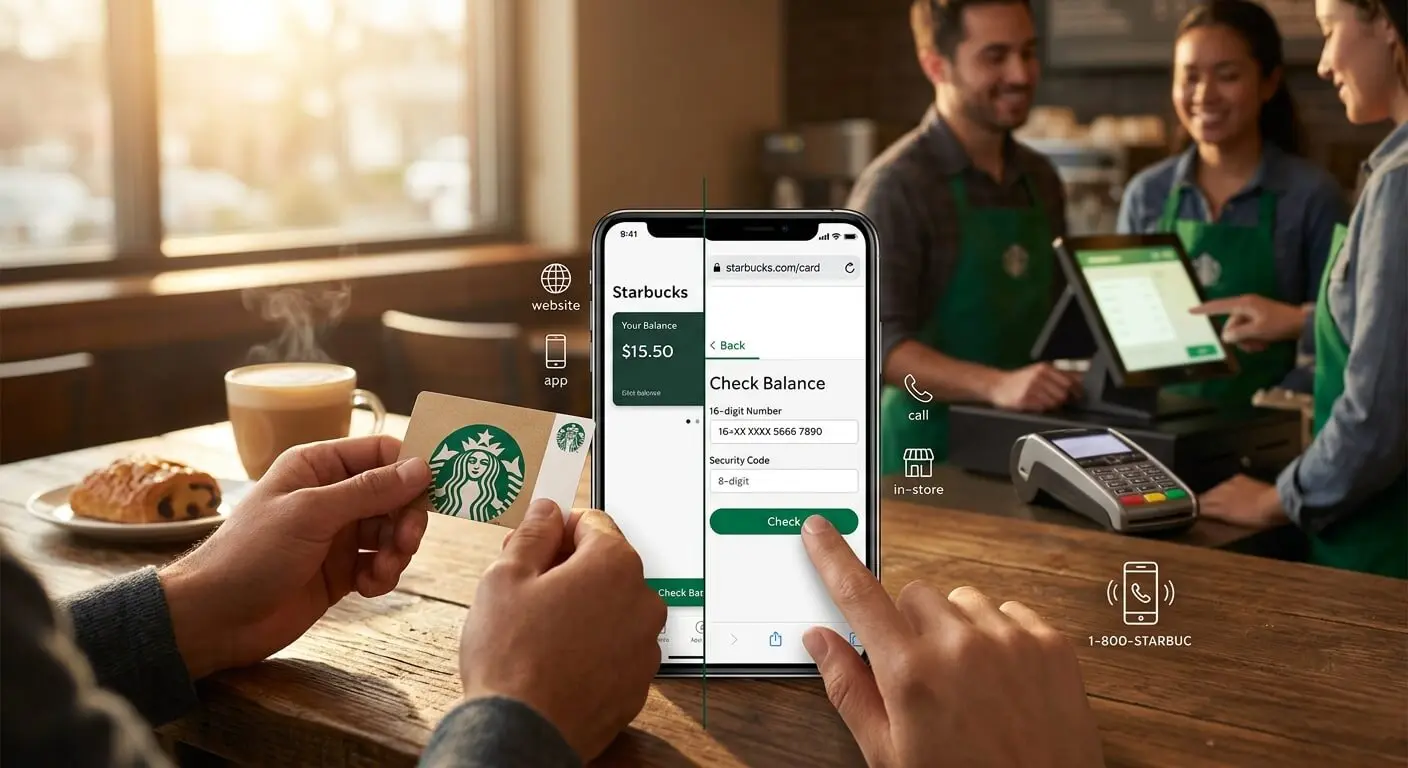
To check your Starbucks gift card balance, go to starbucks.com/gift, select Check Balance, and enter the 16-digit card number plus the 8-digit security code under the scratch-off panel on the back. Starbucks supports four routes — website, app, the 1-800-782-7282 hotline and any store register — and each fails differently once that code rubs off.
How to check your Starbucks gift card balance in under a minute
A Starbucks gift card balance check needs exactly two numbers. On a physical card the 16-digit card number runs across the back, with the 8-digit security code beneath it under a silver scratch-off panel; on an eGift, both sit in the Starbucks email. Checking is free, and Starbucks' card terms list no activation, service, dormancy or inactivity fees, so the figure shown is the full remaining value.
- Website: starbucks.com/gift. No account, needs both numbers.
- Starbucks app: needs a free Rewards account, adds transaction history.
- Phone: 1-800-782-7282. Works from the card number alone.
- In store: a barista scans it, even when both numbers are unreadable.
Enter those two numbers only on starbucks.com or in the official Starbucks app. Anyone holding the card number and security code can spend the balance — which is exactly what third-party "balance check" sites collect.
Method 1: Check your Starbucks gift card balance online at starbucks.com/gift
The fastest way to check your Starbucks gift card balance is starbucks.com/gift, which needs no account and no app. Find Check Balance, type the 16-digit card number with no dashes or spaces, add the 8-digit security code, and submit. The remaining value returns on the same screen, reloads included and no fee deducted. The same page also reloads funds and registers the card to a Starbucks Rewards account.
The failure mode is specific: without a legible security code this route is a dead end, because Starbucks will not return a balance unless the card is already registered.
Method 2: Check your Starbucks balance in the Starbucks app
The Starbucks app shows your Starbucks balance on any card you add once, with no security code needed again. Sign in or create a free Starbucks Rewards account, open the Scan tab (older versions label it Pay), choose to add an existing Starbucks Card, and enter the card number and security code.
The app adds three things the website lacks: full transaction history, so an unexplained drop in your Starbucks balance traces to a date and store; your Rewards Stars beside the money; and a registered card, which makes a lost balance recoverable and transfers possible.
Method 3: Call Starbucks Customer Service at 1-800-782-7282
Call 1-800-782-7282 and Starbucks Customer Service reads your balance back free of charge for the US and Canada. This is the method for a scratched security code, because a representative can look up a balance from the card number alone, which the website cannot do. Dial, follow the prompts, key in the 16-digit number.
Two honest expectations: hold times swing hard by season, and the contact center closes on Christmas Eve, Christmas Day and both New Year's holidays. If the card number itself is illegible, a representative has nothing to search on.
Method 4: Check your Starbucks gift card balance in store
Any barista can check your Starbucks gift card balance at the register by scanning the card, and you can spend it on the same visit. This is the only method that survives damage to both numbers: the balance lives on Starbucks' servers, and the barcode or stripe is just a pointer to it.
Two limits. The in-store route exists only for physical cards; there is nothing to scan on an eGift. And licensed Starbucks counters inside Target, Kroger, hotels and airports are run by the host retailer — Starbucks' filings describe Starbucks Cards as accepted at company-operated and most licensed stores, so those locations may differ.
What to do when the security code is scratched off or the card will not read
A scratched-off security code is recoverable in every case but one. Stop at the first branch that matches your card:
- Card number readable, code gone. Call 1-800-782-7282, or hand the card to a barista.
- Card already registered to your Starbucks Rewards account. Sign in, open your cards, select Manage, read the balance — the code is irrelevant.
- Card number damaged too. In store only; the barcode and stripe carry the data independently of the printed digits.
- Card lost or stolen, and registered. Report it; Starbucks can stop the card and move the remaining balance to a replacement.
- Card lost, never registered. The balance is generally gone — an unregistered Starbucks Card behaves like cash.
Can you check a Starbucks gift card balance without the security code?
You can check a Starbucks gift card balance without the security code in three of the four ways: call 1-800-782-7282 with the card number, ask a barista to scan the card, or sign in to a Starbucks Rewards account it is registered to. Only the web form needs the code.
What happens if you lose a registered Starbucks Card?
If you lose a registered Starbucks Card, Starbucks can replace it with the balance that remained when you reported it. The Starbucks Card Terms & Conditions say this applies "only if you have previously registered it with us," so anything spent before you report it is gone.
How to merge several Starbucks gift cards into one balance
Yes, you can merge Starbucks gift cards in the app in about thirty seconds, which is how four awkward $5 cards become one $20 card. Add each card to your Starbucks Rewards account, open the one you want to empty, select Manage, choose Transfer balance, pick the destination. Three limits apply:
- Same account only. You cannot transfer to a friend's card.
- Full balance, one direction. The transfer empties the source card; there is no partial move.
- No undo. Starbucks also caps what one card can hold, so an oversized merge is refused.
Searches peak in mid-January, when the holiday pile has three cards with $2.40 on them, and again after June graduations.
Do Starbucks gift cards expire, and can you get the leftover balance in cash?
Starbucks gift cards do not expire, and neither does the money on them. The Starbucks Card Terms & Conditions state that "your Starbucks Card has no expiration date nor does the value on your Starbucks Card ever expire," and that Starbucks charges no activation, service, dormancy or inactivity fees.
Two things around the card do expire. Promotional cards and bonus offers carry their own end dates. And Stars are not money: as of September 2026, Green-level Stars expire six months after the calendar month they were earned unless you make a qualifying purchase, redeem a Reward or reload $30 or more digitally, while Gold and Reserve members keep theirs.
On cash, Starbucks' terms say the value "is nonrefundable and may not be redeemed for cash" unless the law requires it — and in several US jurisdictions it does. California is the standout: under Senate Bill 22, effective 1 April 2026, a gift certificate worth under $15 is redeemable in cash there, up from $10, and electronic gift cards now count. Colorado, Connecticut, Hawaii, Maine, Massachusetts, Montana, New Jersey, New York, Oregon, Puerto Rico, Rhode Island, Vermont and Washington set their own thresholds, generally $1 to $5. These rules cover closed-loop store cards, which is why the same request works on a leftover Walmart gift card balance but not on a bank-issued Visa card.
Protect a Starbucks Card the way the FTC recommends
Gift cards are the payment method scammers ask for most: the FTC's Consumer Protection Data Spotlight has reported consumers losing more than $217 million to gift card scams in a single reporting year, and in 2023 FTC data gift cards topped the payment list for romance, tech support and government impersonation scams. The FTC's guidance sits at consumer.ftc.gov/gift-card-scams.
- Register it the day you get it. An unregistered card is cash; a registered card has a recoverable balance.
- Photograph the card number and keep the receipt. The FTC advises keeping a copy of the card and the store receipt, because both are what a claim needs.
- Inspect the packaging on the rack. Skip any card with a misaligned barcode sticker, a rubbed scratch panel or a resealed blister pack — thieves record the numbers, then drain the card once it is loaded.
The FTC's rule is blunt: gift cards are for gifts, only gifts, not for payments. No real business or government agency will ever tell you to buy a Starbucks card to settle a bill or a fine. The same logic explains why gift card generators cannot work: no public tool can mint a code against a balance only the issuer's server creates.
How to fund your next Starbucks run without spending money
CashyGo does not issue Starbucks gift cards, and no honest page should imply otherwise. CashyGo pays out in six card brands plus cash rails, one of which reaches a Starbucks register anyway: a Visa gift card works wherever Visa is accepted. Loading one onto a Starbucks Card online needs a billing address registered with the prepaid issuer first, because reload forms run an address check.
What CashyGo actually pays out, and what it does not
CashyGo pays in points from advertiser offers, and the arithmetic is fixed: 1,000 points = $1. You can cash out from 5,000 points ($5), a $25 Visa card costs 25,000 points, and requests are usually approved within 24 hours. Alongside Visa, the payout list is an Amazon gift card, Google Play, App Store, Netflix and Spotify, plus PayPal, bank transfer and crypto, availability varying by country. Venmo and Cash App are not CashyGo payout methods.
Points come from spare-minutes work. Surveys for money typically pay 500 to 5,000 points each; app installs, ad views and quizzes sit lower; game offers run up to 50,000 points for a demanding multi-day milestone, which is where people who want to earn money playing games concentrate. Crediting is usually automatic — minutes for most offers, up to 48 hours to sync, up to 7 days for a slow advertiser, and [email protected] for anything that never lands.
This is not how to get free money in the sense of money appearing for nothing — it is advertiser budget paid for real attention, so a $25 card is a few evenings of effort. None of the free apps that pay real money instantly are instant; minimum cash-out thresholds decide how long a first payout takes.
Frequently asked questions about Starbucks gift card balances
How do I check my Starbucks gift card balance online?
Go to starbucks.com/gift, select Check Balance, enter the 16-digit card number with no dashes or spaces, then the 8-digit security code from under the scratch-off panel. No account is required, and for a Starbucks eGift both numbers sit in the original email.
Can I check a Starbucks gift card balance without the security code?
Yes, in three ways: call Starbucks Customer Service at 1-800-782-7282 with the card number, hand the card to a barista to scan, or sign in to a Starbucks Rewards account the card is registered to. Only the web form needs the code.
What number do I call to check a Starbucks gift card balance?
Call 1-800-782-7282, the Starbucks Customer Service line for the US and Canada. The call is free, the prompts ask for the 16-digit card number, and the system reads the balance back. It works even when the security code is scratched off.
Do Starbucks gift cards expire or lose value over time?
No. The Starbucks Card Terms & Conditions state that a Starbucks Card has no expiration date and its value never expires, and that Starbucks charges no activation, service, dormancy or inactivity fees. Rewards Stars are separate and do expire at Green level.
Can I combine two Starbucks gift cards into one balance?
Yes. Register both Starbucks Cards to your own Starbucks Rewards account, open the card you want to empty in the Starbucks app, select Manage, choose Transfer balance, and pick the destination. The transfer moves the full balance and cannot be reversed.
Can I get cash back for a small leftover Starbucks balance?
In some US jurisdictions, yes. California requires cash redemption of gift certificates worth under $15 as of 1 April 2026 under Senate Bill 22, and Colorado, Connecticut, Hawaii, Maine, Massachusetts, Montana, New Jersey, New York, Oregon, Puerto Rico, Rhode Island, Vermont and Washington set their own small thresholds.
Does CashyGo give out Starbucks gift cards?
No. CashyGo does not issue Starbucks gift cards. CashyGo pays out in Amazon, Google Play, App Store, Netflix, Spotify and Visa gift cards, plus PayPal, bank transfer and crypto. A Visa gift card works anywhere Visa is accepted, including a Starbucks register — the closest route to free gift cards that buy coffee.
How long does a CashyGo gift card withdrawal take to arrive?
CashyGo withdrawal requests are usually approved within 24 hours once you reach the 5,000-point ($5) minimum. Reaching it is the slower part: points credit automatically, most within minutes, some up to 48 hours, and a slow advertiser up to 7 days.
Checked on 21 September 2026 against the Starbucks Card Terms & Conditions and Rewards Terms of Use at starbucks.com, the FTC's gift card guidance, and legal summaries of California Senate Bill 22; app labels and state thresholds change.